


You’ve encountered this, I know, you know. You’re managing an ecommerce site and upon accessing Google Search Console, you’ve come across a series of unpleasant errors that basically generate errors in your products. At first, they were only shown as warnings in yellow, but over the past few months, they’ve become “critical” errors.
This recent Search Console report has been causing headaches for online store owners. However, don’t be alarmed, it’s not something that will remove you from search results, but it does help Google understand how to display your website better, so you should correct it as much as possible.
Problem with structured data
First, we need to understand where the error originates. This is due to your CMS presenting some structured data by default where it shouldn’t. This structured data or schema is nothing more than a format to help Google understand your content and display it better in search results.
If you’re using WooCommerce, the implementation of structured data extends to pages beyond products per se, which causes confusion for Google and its search engine. Therefore, and in general, the error is found in the structured data of product categories and stores; basically, they shouldn’t be there.
This structured data should only be on products, category or store pages shouldn’t have the same schema markup as a product since they have a list. If I’m being strict, they could have a different schema, but not the same one as products, which is the case. WooCommerce said some time ago that they would fix this soon, but as you can see, nothing has happened yet.
But since we don’t like waiting and neither does our competition, we’re going to fix the error manually.
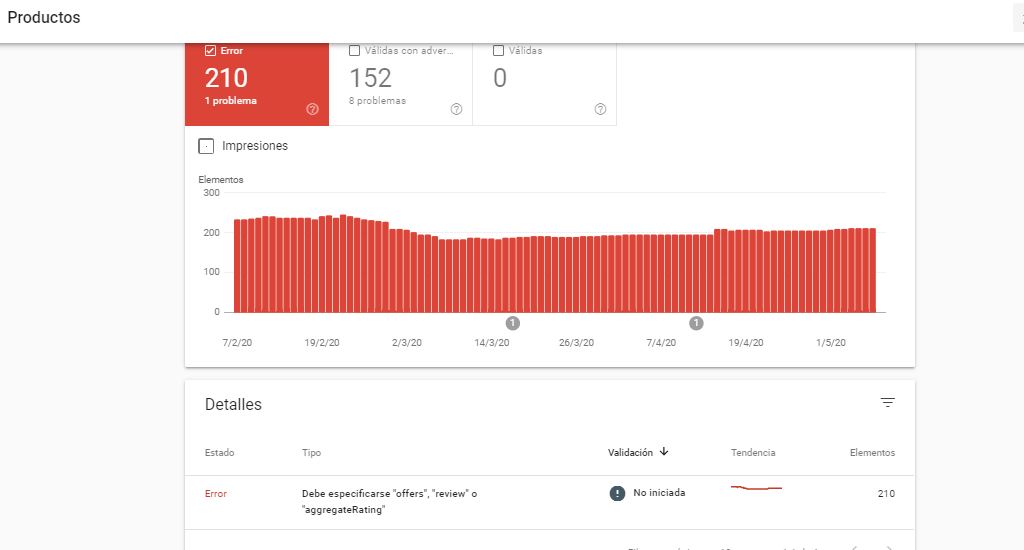
Product errors in Search Console.
Solving the problem
What we’re going to do is remove the structured data that’s on product categories and stores by default. Don’t worry, this doesn’t affect your SEO or visibility because:
- Google wasn’t displaying them anyway.
- It only affects categories and stores, not individual products that should have them.
- WooCommerce will soon release an update that does exactly what we’re going to do.
- If you want to add a separate schema, you’ll be able to do it for categories and stores.
Applying the functions code
What you have to do is simple, add this code to the functions.php file of your child theme in WordPress to remove the markup from those areas.
/*** Remove category and store markup.
function wc_remove_product_schema_product_archive() {
remove_action( ‘woocommerce_shop_loop’, array( WC()->structured_data, ‘generate_product_data’ ), 10, 0 );
}
add_action( ‘woocommerce_init’, ‘wc_remove_product_schema_product_archive’ );
I know there’s also a similar problem with Magento and Prestashop, and I’ll soon publish a solution for both.