



I have learned a lot about how to approach online marketing strategies over the years. I think that at the beginning, our biggest mistake is always the same in general terms, we focus too much on seeing what the competition is doing and we forget all the data that our own business gives us. And about that, I want to write to you today, with a small tip that can make us gain a lot in our projects.
We need to start looking at and analyzing our internal data to improve and know better how our visitors buy, search and interact. The material we will need to start with this configuration is the following and I assure you that the results will be worth it.
Contenidos
Requirements
- Google Analytics and that our website has the tracking code implemented.
- 5 free minutes.
Internal searches on your website or online store
What I want to teach you is how to use internal searches on our site to boost visits, retain customers and sell more. This applies to any type of website, it doesn’t matter if it’s a news website, a services website, an online store or a blog. The idea is to register the searches that our audience makes on our site to extract information and apply it effectively.
But first of all, let me tell you why this simple configuration is so powerful. What is all this about internal searches for?
Let’s use a simple example, imagine that you have an online store where you sell bracelets. By looking at the searches that people make on your website, you can detect the following:
- Products that you don’t sell but that are in demand and you could add to your stock.
- Features or information that people search for in your store regarding your products, but that you don’t have reflected in the description.
- Information related to your sector that can help you to feed your store or business blog.
- Transactional keywords that you don’t have worked on and optimized on your website.
As you can see, we gain a lot for nothing. Practical example, if you expand the information in the descriptions of your products based on what your visitors search for, you will be gaining keywords and responding to the needs of the user, so you will not only facilitate the purchase for them, but it will also help Google to reward you to position better in its search engine. You should already know that Google’s vital function is to respond to the needs of the visitor.
How to see internal searches on your website in Analytics?
This is the easiest part, the installation. To do this, you need to enter Google Analytics and in the lower left part you will see the icon of a gear. When you click on it, 3 columns will appear on the right side that are called: Account, Property and View. It is in this last one where we need to go and click on the option that says “View settings“.
Once you are in the view settings, you just need to activate a field that by default comes deactivated called “Site search tracking“. Once active, a new field will appear that asks for the query parameter; each content manager (WordPress, Joomla, Prestashop…etc) has a different search parameter, for example in WordPress we would only have to write the letter “s” in lowercase.
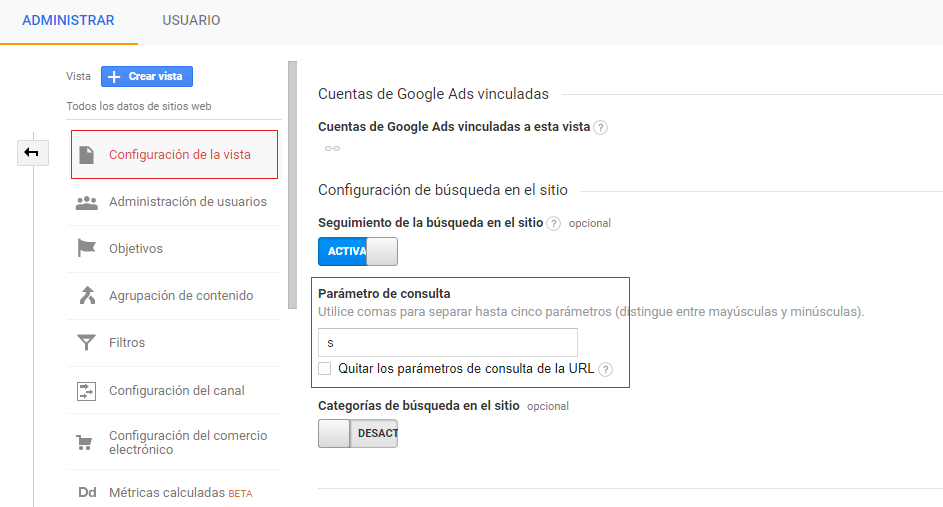
I leave you the parameter that you will have to write depending on the CMS or online store you are using.
- Drupal: search
- Prestashop: search_query
- Joomla: searchword
- Magento: q
- WordPress: s
- Woocommerce: s
How to work with these data?
Think that these data were not being collected before, so initially you will not see anything until a few days have passed. I would recommend waiting a reasonable time of about 2 or 3 months to have a more or less acceptable number of queries to work with. To see these queries, go to Google Analytics: “Behaviour” and then “Site Search”.
There you can see interesting data such as search terms or search pages. We can also see how much time our visitors spend searching and much more. How you use this new information depends on you, be creative.
If you still have doubts, in this video, Bruno Ramos explains it quickly.
I say goodbye hoping that this post has been helpful to you. If you want me to help you with the configuration or reports, leave your query in the comments.