



Update 27-07-2019 ?
If you also want to remove the links to the feeds of all headers, you can add this function to your functions.php file, remember to make a backup first. This is good to avoid the error that Search Console throws when it tracks the feed but does not index it. Also, you get rid of some “junk” from your project’s headers.
remove_action('wp_head', 'wlwmanifest_link'); //removes wlwmanifest (Windows Live Writer) link.
remove_action('wp_head', 'wp_generator'); //removes meta name generator.
remove_action('wp_head', 'wp_shortlink_wp_head'); //removes shortlink.
remove_action( 'wp_head', 'feed_links', 2 ); //removes feed links.
remove_action('wp_head', 'feed_links_extra', 3 ); //removes comments feed.
remove_action('wp_head', 'feed_links_extra', 3 );
The Yoast plugin is currently the most recognized in the SEO environment for WordPress. There are probably people who, like me, opt for other more flexible and lightweight initiatives like Rank Math or some more complete ones like All In One SEO. But, I’m not here to debate about plugins, at least not today ?.
The case is that a new change in the way Yoast indexes feeds is being a headache for some users. Basically, Yoast has now removed the noindex tag from the RSS and they will be indexed by default.
Contenidos
Indexing or not indexing feeds
According to the company, the “boom” of podcasts has made Google look at them with different eyes, and proof of this is that they show them in their search results. What’s the problem with all this? Well, basically, if you have them under the noindex tag, they won’t be incorporated into the search engine, and to prevent this, the plugin now restricts that possibility.
But what if you don’t upload your podcasts or don’t manage them through your blog? That is, you use external services like Ivoox or Soundcloud, or you don’t use podcasts at all. Well, to put it bluntly, you’re out of luck. So, I’m writing this quick post to provide a temporary solution.
Solution to the indexing of feeds with Yoast
If, for whatever reason, you still want to use this plugin and don’t want your feeds to end up in search results, the ideal thing is to tell Google not to index them. I’m going to offer a temporary solution that involves modifying WordPress core files, keep in mind that if you update your CMS version, this solution may disappear.
As soon as I can, I’ll post a function for the functions.php file and share it so that it’s a more definitive solution. But in the meantime, let’s get to it.
Adding noindex to your feed
To solve all this, you just need to follow these simple steps:
- Locate the feed-rss2.php file, which is in the /wp-includes/ path of your installation.
- Save a backup of the file, just in case.
- Open the original file and add this code to the header of the file. I’ll leave you an image to see where you need to put it.
Code to add: <meta name="robots" content="nofollow">
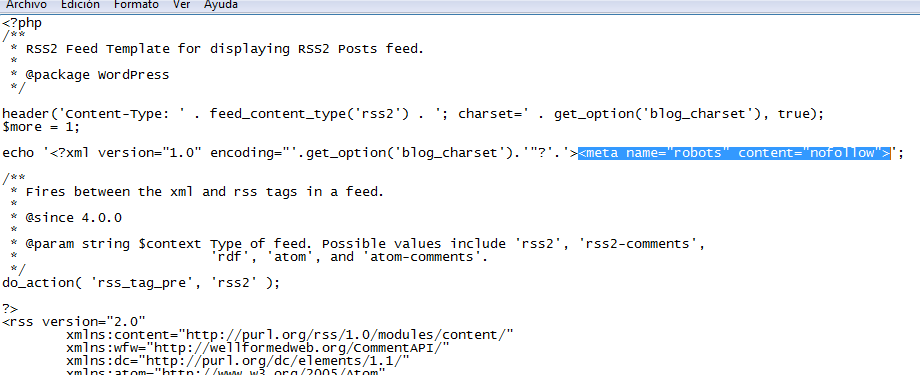
In this screenshot, you can see where to put the code.
To check the result, you can go to Search Console and try to request the indexing of your feed’s URL. If everything has gone well (which it should), you’ll see the same thing as in the screenshot, that the URL is excluded by noindex.
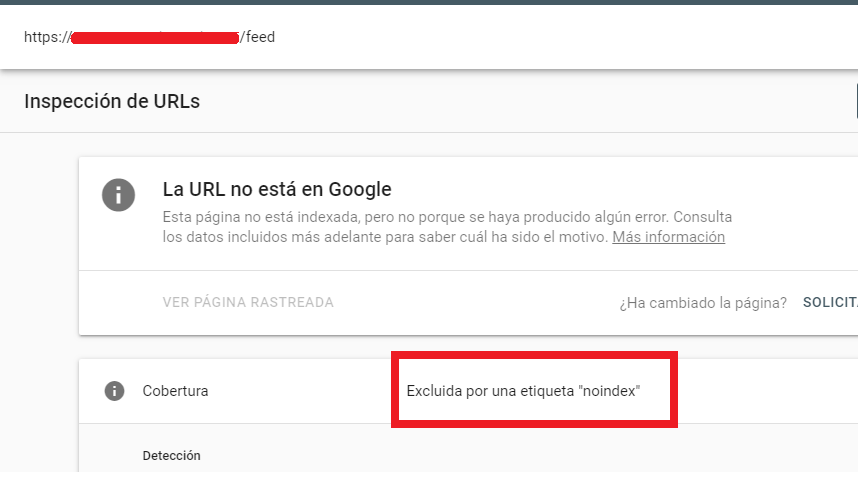
This is how you should see your feed in Search Console. If it’s not like this, something went wrong.
To keep in mind
- We are only adding noindex. You will have to block the feed in robots.txt if you don’t want it to be crawled.
- Blocking the feed only in robots.txt does not ensure that the content will not be indexed. If you don’t follow these steps or similar ones that I comment, you will see the following message in Search Console: “It has been indexed although a robots.txt file has blocked it”. So, you have to mark the meta-robot that I comment.
- Do not use the noindex tag in robots.txt, Google removed that directive.
- This change we apply affects all the feeds on your website, not just the main one; also the blog, for example.
If you think there’s a more elegant or better way to solve this problem, I invite you to leave it in the comments of this post. As always, a like, share, or link to this post is always welcome ☺️.